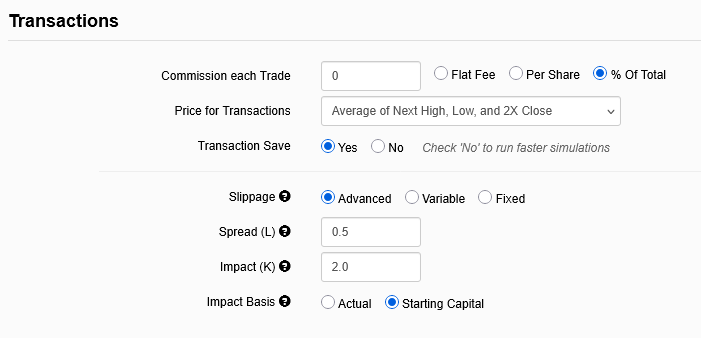
Portfolio123 has released an advanced slippage option for simulations. You can see it in the "General" tab when you set up a simulation:
Prior to the release, users had two options: use a variable slippage formula that was invariant to order size or use a user-estimated fixed slippage cost.
Now we can have our transaction costs cleanly calculated according to decades’ worth of academic studies on how transaction costs work, studies that I have confirmed using my own logged trades.
Transaction costs can be split into two categories: spread costs and market impact costs.
Spread costs are relatively easy to understand. How much of the spread are you paying every time you make a trade? If you never used an algorithm and your broker just executed blindly and your stocks were relatively liquid, you’d pay 50%. If you only traded OTC stocks and always hit the bid on your buys and the ask on your sells, you’d pay 100%. If you use smart order routing, brokers that give you “price improvement,” VWAP or POV or hidden orders, or a prime broker that uses not held orders, you may end up paying quite a bit less than 50%.
Market impact—how much your particular order moves the price of the stock—has been shown to vary according to the product of a) the volatility of the stock and b) the square root of the proportion of the size of your order to the actual total trades of the stock.
So we at Portfolio123 have boiled this down for you. All you have to do is to make three decisions:
What are your typical spread costs? If you think you’re paying half the spread per trade, then go with 0.5, which is the default.
What are your typical market impact costs? The default is twice the product described above as a percentage of the trade. So, for example, let’s say you want to buy $500,000 worth of Smith & Wesson (SWBI). Volatility is 0.0174 and liquidity is $5.85M. If you set K to 2.0, then your trade impact would be 2.0 * 0.0174 * √(0.5/5.85) = 0.0102, or 1.02%.
Now while 2.0 is the default, this is far higher than what I’d recommend you use. A recent paper (https://arxiv.org/pdf/2105.00521) includes this passage:

This suggests that you should set K = 1, and a recent study of AAPL trades (https://arxiv.org/pdf/2606.24019) suggests that K should be 0.63 and 0.77. 2.0 is good if you want to be really safe in estimating the costs of trading low-volume stocks, but it’s probably not realistic.
How much are you trading? In the box marked “Starting Capital” don’t just use the default—use the actual size of your portfolio. Or, if the number of stocks you hold in your simulation is four times the number of stocks you hold in real life, put four times the size of your portfolio in there.
As to whether to use click “Actual” or “Starting Capital,” I recommend using Starting Capital if you want to use the simulation to estimate the results of future trading, and using Actual if you want to use the simulation to estimate what would have happened to a real portfolio as it grew in size from the starting capital to, say, one hundred times that starting capital. In other words, if you use Actual, you’ll get larger and larger transaction costs as your portfolio grows (or smaller transaction costs as your portfolio shrinks). I think most users will want to use Starting Capital: that’s what I’ll be using, and that’s the default too.
Transaction Cost Model (a.k.a. Slippage) - Portfolio123 - Help Center has all the details of how everything is calculated.
We’ve also added two functions that can be used in screens, ranking systems, universes, simulations, or anywhere else:
SlippageVar( bars )
This gives you the variable slippage, which in sims is hard-coded to a ten-bar lookback, but here can be calculated with any lookback you’d like.
SlippageAdv( amount [, spread = 0.5, impact = 2.0, offset = 0, bars = 20])
This gives you the new advanced slippage. Amount represents the amount being traded. It’s used in conjunction with previous close to calculate the number of shares being traded.
Both these functions return percentages, so 0.1 means slippage of 0.1%, not 10%.
If you’re using advanced slippage in your sims, you should probably use this rule in your universe: SlippageAdv(100000) < 100. Stocks that have either 0 liquidity or 0 volatility will end up with slippage of 200%, and those can mess up your simulation.
Please feel free to ask questions below.