How to use LinReg with custom formulas

Hello All,

How can I use LinReg (linear regression) with custom built formulas? I want to compute the slope of a custom called here $factor. I think I should be able to use something like this:

Eval(LinReg("$factor, Fhist("$factor",52)), RegGr%(4), NA), which would compute the slope of $factor and $factor 52 weeks ago (1 year).

However I get this error:

  • Metric formula could not be validated
    Formula '$factor’ not found. Either share the Formula with the same group or check the sharing settings of the item in which the Formula is referenced. (Private items may not be referenced by items shared in a group.)
  • I think there can also be an error when using quotes (“ “) inside of other quotes.

How can I work around this?

Many thanks!

"compute the slope of $factor and $factor 52 weeks ago (1 year)."
It wont let you run the regression with less then 3 data samples. Below are 2 examples and you can modify the combination of iterations, start and increment settings in LinReg.

This would calculate the slope using 13 samples that are 4 weeks apart.
Eval(LinReg("Fhist(`$factor`,CTR)",13,0,4), Slope, NA)

Or you could do 52 samples 1 week apart.
Eval(LinReg("Fhist(`$factor`,CTR)",52,0,1), Slope, NA)

You are correct regarding nested double quotes giving an error. If you have a formula that needs multiple sets of double quotes, replace one set with backtick characters. That is the ` character which is usually found below the ~ on your keyboard. It is not the same as a single quote. This is standard Portfolio123 syntax any time the formula would contain quotes nested inside other quotes.

1 Like

Hi @danp thanks for your message.

Yes this looks like a good alternative but is not exactly what I am aiming for.

I want to be able to replicate exactly the behaviour of a formula like

Eval(LinReg("Sales(CTR, QTR)", 4),Slope,NA) : [1]

If you define a custom formula like $SalesQ = SalesQ
Eval(LinReg("Fhist(`$SalesQ`,CTR)",13,0,4), Slope, NA) : [2]

will not evaluate exactly to [1]

since companies do not release data consistently every 13 weeks (sometimes 11,12,13, or 14 weeks).

Another alternative would be LinReg("Fhist(`$SalesQ`,CTR)",52,0,1), but the regression would be skewed because of the majority of the values are constant (4 unique values per quarter).

Is there a way to add custom formulas in Linear Regression / Loop Functions that would behave like built in formulas?

To me this is quite limiting when you build custom formulas to not have this possibility.

tr,

I use imported data with LinReg. Because imported data includes the date associated with each data value, I can set whatever date I want in the imported .csv file. I set it to 30 days past fiscal quarter end (so, 30Apr, 31Jul, etc.) to obtain consistency across all my imported data and to avoid look ahead bias. When I import the data all the dates are consistent across all my imported values, making the use of 0, 13, 26, 39, etc. weeks offset viable. I suspect there are a very few edge cases where my results are inaccurate, but so far it’s produced expected results. The solution may be to massage the dates in your .csv file prior to importing.

One other issue I ran into, and resolved, was the fact that LinRegVals returns a value of ‘1’ if successful. In the example below where I want to set my formula result to the slope of the regression, I have to subtract that ‘1’ to get an accurate reading.

LinRegVals(FHist("$$EffRtio",52), FHist("$$EffRtio",39), FHist("$$EffRtio",26), FHist("$$EffRtio",13))+slope-1

Thanks for your answer.
However, I am not importing custom factors like you are but directly using the data from P123. And the quarter dates are not fixed so FHist() yields wrong results.

A solution would be to add make custom factors (denoted with a $) readable for such functions so we can identify previous values not based on time but on actual different values like:

Eval(LinReg("$Sales(CTR, QTR)", 4),Slope,NA)

How hard would that be to implement in P123? @marco

Hello,

I am surprised that no one has been confronted to this problem before. I am wrestling with the question is how to handle properly custom formulas with Loop or LinReg functions?

I currently use Fhist($custom_factor) to handle this but this does not lead to the required result. For example, let’s say I want to compute the moving standard deviation over 12 periods of EPS_TTM.

Since EPS is a built in factor I get this very simple formula:

(LoopStdDev("EPSExclXor(CTR,TTM)",12))

However, if I create a custom formula (let’s say I define $EPSExclXorTTM = EPSExclXorTTM), the best way I found to mimic the behaviour of the formula above is

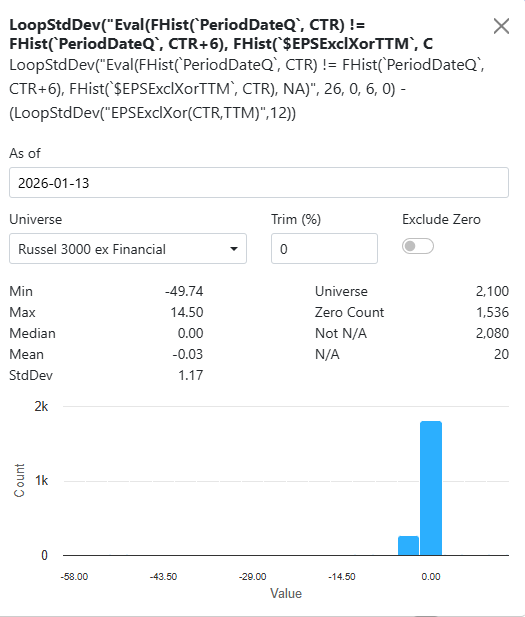
LoopStdDev("Eval(FHist(PeriodDateQ, CTR) != FHist(PeriodDateQ, CTR+6), FHist($EPSExclXorTTM, CTR), NA)", 26, 0, 6, 0)

The difference of the 2 distributions is in the picture below: Around 500 values (25%) of values are different. This yields in different results during ranking and often increased turnover with my current formula so decreased performance overall (not to mention extended computation times!)

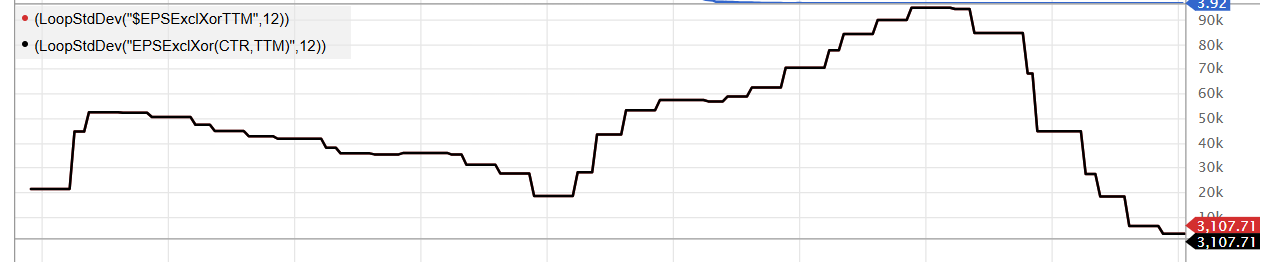
The below picture shows the result of both formulas for a well behaved stock like MSFT

The below picture shows the result of both formulas for a ill behaved stock like GRDX

Please see here the distribution of the difference of the factors over the R3000 universe:

To cover these issues, would it be possible to include custom formulas inside Loop/LinReg functions like this: (LoopStdDev("$EPSExclXorTTM",12)): ie compute rolling standard dev of last 12 values of $EPSExclXor(CTR,TTM).

Thanks to all

How could this actually be implemented? If a custom formula consists entirely of things that are in a financial report, then you can simply write a rather long LoopStdDev formula with lots of CTRs in it. But if it mixes things from a financial report with, say, estimates, or market cap, or volume, or a time series, or price, how could it be implemented? You'd have to have a way to look at every single custom factor and determine what it consisted of and then apply the appropriate logic, if there is one. But maybe you have an idea of how to implement it that isn't occurring to me . . .

Hey guys i found the solution to use custom formulas inside Loop's and LinReg. To do so please do the following:

$EPSExclXorTTM = EPSExclXor(ctr,ttm)

and define your loop as: (LoopStdDev("$EPSExclXorTTM",12))

1 Like