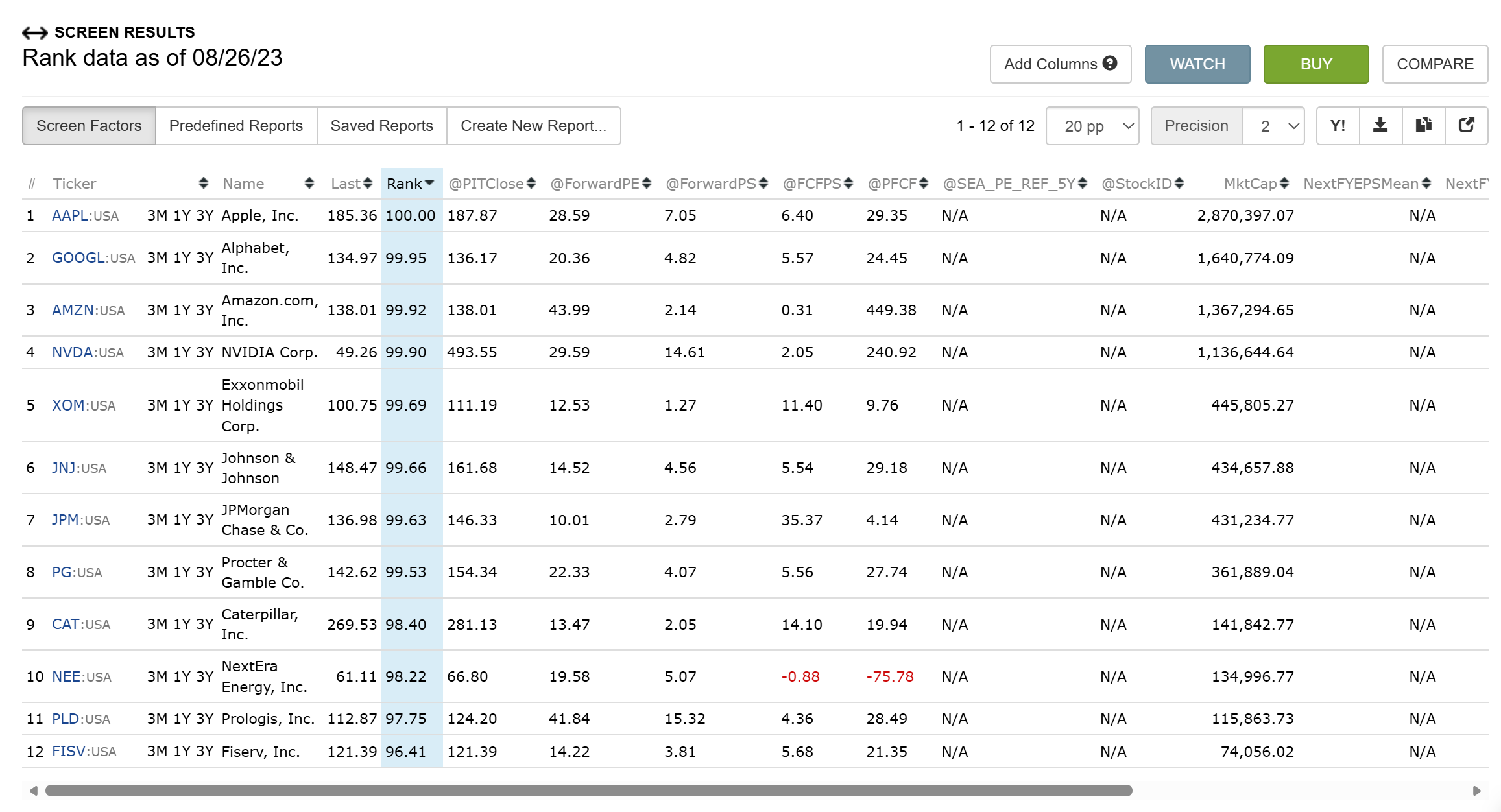
Imported stock factor returns N/A on historical as-of dates
I created an imported stock factor named $$SEA_PE_REF_5Y containing weekly point-in-time observations for Fiserv.
Settings:
Max Days: 1600
FHist Range: 0
Formula: ShowVar(@SEA_PE_REF_5Y, $$SEA_PE_REF_5Y)
Fiserv Portfolio123 StockID: 3598
The downloaded factor confirms that Portfolio123 stored all 1,010 weekly observations correctly against StockID 3598, including:
2026-08-21: 30.7445195652
2025-08-29: 32.3759036832
2023-08-25: 50.2944827586
2018-08-24: 28.8359522546
Screen results:
Rank date 2026-08-22: returns 30.74 correctly
Rank date 2025-08-30: returns N/A
Rank date 2023-08-26: returns N/A
Rank date 2018-08-25: returns N/A
The 2023 observation should be comfortably within the supported 1,600-day window when measured from its historical analysis date.
I have tested imports using the current ticker, CIK, FIGI and exact Portfolio123 StockID. The downloaded factor shows the correct historical dates, values and StockID, but historical screen calculations still return N/A.
Could you please confirm whether this is a defect in historical retrieval of imported stock factors or advise what setting is required?
I tried historical retrieval of imported stock factors in the screener and it does work.
I took a look at your imported factor on our end, ran it through a screen, and changed the as-of date across several periods. Each time, the values that came back matched what's in your imported stock factor file. So I'm not seeing a defect in historical retrieval.
If you can send me a specific example of how you're running it. The screen itself, the rule you're using, and the as-of date, I'm happy to look at it directly.
Expected value from the imported file dated 08/25/2023: 50.2944827586
Actual result: N/A
This run has no Quick Stats date range displayed, so End Date is not affecting the test. The other securities are expected to be N/A because the pilot factor was imported only for FISV. Could you please run this exact screen and date on your side?
Ok, you're running into the data display limits established by our data vendor.
Current data: (As Of < 10 days ago)
Site displays the data for all rows and columns.
The Download only has non-NA data for the first 500 rows.
Historical data: (As Of >= 10 days ago)
Site displays only first 5 columns and the rest are NA.
Download values are all NA.
Download is limited to 100 columns.
The only way to have totally unrestricted access to view and download data is to purchase a data license directly from FactSet. But the data license is expensive, so few users do this.
Thanks, that explains the N/A behaviour I was seeing.
One clarification, as I want to make sure I understand the distinction correctly.
Walter previously tested my imported stock factor historically and confirmed that, when changing the As Of date, the values returned matched the historical values in my imported stock factor file.
Is the 10-day historical restriction you describe applicable only to FactSet-sourced data, or does it also apply to user-imported Stock Factors?
For example, if SEA_PE_REF_5Y contains historical values that I have imported myself, can I access/use those historical values in a screen or backtest beyond 10 days, even though the underlying FactSet columns cannot be displayed or downloaded?
That distinction is important for what I am trying to build.
It shouldn't, they were imported by you, it's your data. Unfortunately the existing code is not making a distinction. Might be an easy fix, might not be. I'll find out.