I am trying to use LoopFunctions with Fhist() inside. Why? It is the only method I can find to use custom formulas inside loop functions.
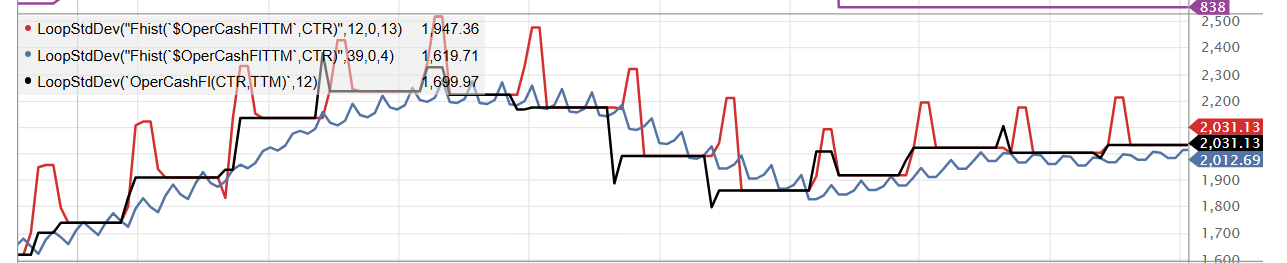
However when I do this, since companies don’t release their earnings every X weeks, with X constant (usually 13 weeks but not always), I can get some jumps in the timeseries I build with Loop + Fhist(). As you can see on the photos when I use the Fhist() formula inside the Loop (1st photo is JNJ which is very bad, 2nd photo is MSFT which is pretty good).
Ideally, I would want something like the Black Line in my graphs, ie something that changes every quarter to prevent excessive turnover.
Is there another method to use custom formulas inside Loops? How can we prevent artificial jumps in the timeseries due to inconsistent release dates?
I'm not suggesting you use custom formulas inside loop functions, but that you take the custom formula itself and adapt it for the Loop function. For example, if your custom formula is ((ebita+isna(amorta,0))*(1-0.0095*isna(txrate%a,0)))/(asttota - cashequiva - isna(liabcura - dbtsta,0) ) you would use LoopStdDev("((ebit(ctr,ann)+isna(amort(ctr,ann),0))*(1-0.0095*isna(txrate%(ctr,ann),0)))/(asttot(ctr,ann) - cashequiv(ctr,ann) - isna(liabcur(ctr,ann) - dbtst(ctr,ann),0) )",5)
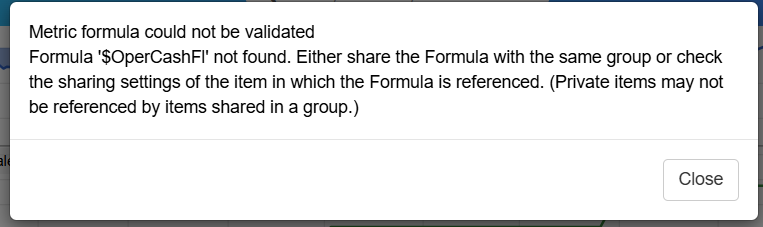
Yes indeed that would work but can be very cumbersome especially for custom formulas that derive from other custom formulas. Could we implement this in P123 ? This would be very helpful and should not be too hard to implement.
LoopStdDev("Eval(FHist(QTRComplete, CTR) != FHist(QTRComplete, CTR+6), FHist($OperCashFlTTM, CTR), NA)", 26, 0, 6, 0).
Basically you scan every 6 weeks if the value of your custom function has changed and you do that 26*6 = 3 years and this mimics very well the usual function LoopStdDev("OperCashFl(CTR,TTM)",12)