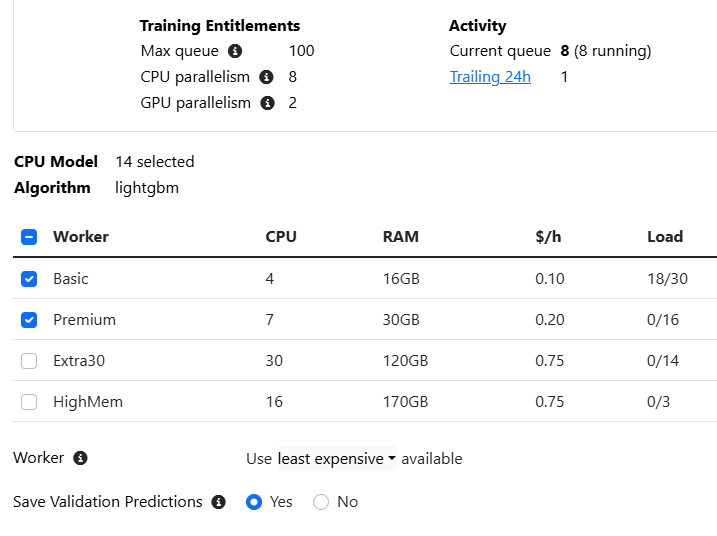
I have encountered the following error in AI-factor: "Out of memory. This worker has a limit of 16GB of memory. Please choose a worker with higher memory resources." However, I am unsure why I am experiencing a memory peak, given that I ran the same algorithm on the same universe two days ago, albeit with slightly fewer features. Are there any known issues with AI-factor?
Additionally, is there a way to determine in advance how much memory an algorithm will require?
And what happens when I choose Basic and Premium? Will it first try to run the task on the Basic Worker, and if that's not enough, will it try the premium?
Work is dispatched according to load alone. So if you choose Basic and Premium, least expensive, and there are available slots on Basic, it will always start the work on Basic and will not retry elsewhere. We haven't implemented anything to estimate peak memory usage given an arbitrary algorithm/parameters combination.
In this particular case, your new AI Factor using a different universe, and the dataset is 190% larger. You'll have to train on Premium, as the message suggests.
Does this mean that its best to use the worker with the highest memory if in doubt?
I selected all the workers, assuming it would pick the appropriate worker but then had a bunch of canceled jobs. Is there a rule of thumb to know which worker to pick when using a ton of algos without going overkill?
Unfortunately, whether or not a model will exceed the memory limit is largely based on the relationship between the model (algorithm with its hyperparameters) and the dataset size. Some parameters can have a dramatic effect on memory usage, and there is no straightforward way to offer an estimate for each model, accounting for all possible combinations that affect memory consumption.
Analysis of past successful training tasks shows that roughly 98% of tasks stay under 16 GB and 99% of tasks stay under 30 GB.
And if this helps any, here are the predefined models that dominate the top of the distribution: