Today’s change to the Screener to always return with “Show Less” activated is very annoying and a waste of effort to click to display all. Please revert to retaining what was last used for the next display.
TIA,
Rich
To add another issue, I toggled on the “Screen Factors” under “Screen Reports” and it displayed. However, I am unable to switch back to the “Predefined Report”. Even logging off P123 and back on does not reset this. Please revert.
I’m unable to reproduce the "Screen Factors" errors you described in either Safari or Chrome. In both browsers, the behavior is consistent:
- After running a screen, I can switch to Screen Factors and view all factors as expected.
- Switching back to Predefined Reports, all reports (Expectation, Finance, Growth, Markets, etc.) are present, active, and displaying correctly.
- My Saved Reports are also available and functioning as expected.
Please provide which platform and browser you’re using.
Edition Windows 11 Home
Version 25H2
Installed on 1/25/2025
OS build 26200.8037
Experience Windows Feature Experience Pack 1000.26100.300.0
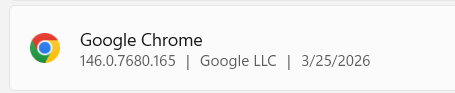
I’ve shut-down and stated up again twice going to the food bank where I volunteer. It now looks to be resetting to “Predefined Reports” as the default after a reboot. However, once “Screen Factors” is toggled it cannot be moved away from. Also, why do all the Backtest results disappear when one “Screen Factors” request is displayed? It is wasteful in compute resources and time.
Cheers,
Rich
The Screener’s Show More / Show Less setting should persist based on your last selection.
For example, if you select Show More, continue working, then log out and log back in, the Screener should still display Show More when you return. This preference is saved for your session.
Are you seeing different behavior on your end?
What I am seeing is that for one execution of Backtest it returns in “Show Less” format. When I click the arrow in the bottom of the window bar it expands. I can now move to different screen like Rules and it retains the full view which is a change from yesterday. When I Rerun Backtest it switches back to the collapsed display.
When looking at the backtest results for a period as long as I stay with the view I came in with I can look at other periods. However, if I select another view and I can do that between multiple views, the backtest result set disappears and has to be rerun to get access to a different date.
The toggle to “Screen Factors” issue I reported in the original post looks to be that returning to “Predefined Reports” is now a two step process where one gets the list of reports and has to make a selection instead of returning to the prior one or the default like before.
We can arrange a Zoom (or like) session if you wish to see what is happening. Unfortunately I will be out-of-pocket for the next several hours.
Cheers,
Rich
Ok, I see the issue now.
Summary of Issue (Screen Report Behavior):
- After running a new screen, the initial displayed report is Predefined Reports -> P123 Default as expected.
- Navigating to Screen Factors works correctly and shows factor results.
- When switching back to Predefined Reports, no subcategory (e.g., P123 Default) is selected.
- If the screen is rerun in this state, the view reverts back to Screen Factors instead of staying on Predefined Reports.
- The system appears to default to the last valid/selected report view.
Workaround:
- Manually reselect a subcategory (e.g., P123 Default) under Predefined Reports before rerunning the screen.
- Once a valid report is selected, the view persists correctly on subsequent runs.
- But as described in Summary;
- Navigating to Screen Factors works correctly and shows factor results.
- When switching back to Predefined Reports, no subcategory (e.g., P123 Default) is selected.
Scope:
- Same behavior applies to Saved Reports—no default selection leads to fallback to the last valid report (often Screen Factors or prior Predefined Report).
Solution:
- Introduce Persistent “Last Valid Report” State. Maintain a session-level object that always reflects the last executable report configuration for each of the following categories: Screen Factor, Predefined Reports, Saved Reports. New sessions default to Predefined Reports->P123 Default. And Saved Reports->(first listed report)
Do you agree?
The proposed solution addresses that Issue.
The other two (?) still need solutions.
Cheers,
Rich
The "Show Less" issue is also understood and will be addressed.
I'm having trouble following the setup for the backtest display report and want to make sure I understand the issue correctly. I have limited availability today and tomorrow, but I'm free on Monday. Would you like to schedule a Zoom call then so we can walk through it together?
Thank you Walter for scheduling the Zoom call. It was productive in explaining what I am seeing and am looking forward to seeing the corrections.
Cheers,
Rich