I have made a script to optimize normalization and transformations prior running a machine learning algo on a complete dataset. However, to download data and run it locally (on our own computer) would require a license with FactSet, so if it would be possible to run a script like that on the P123 servers, that would solve the license issues.
The bug is fixed.
Download v2.4.3
I love it! Please make sure that factors can be ranked not only by universe, but by sector or industry, which isn't the case at the moment. Thanks!
There is actually another bug in the production export I need to fix. The features that has had overrided direction is not passed on, will have to fix this. Haven't been using the production export, that's why bugs appears here.
The export of the Results-Export XML is correct.
There are two ways to go about this:
a) We only generate a raw dataset and give it to the app. If the app supports normalizing by industry, then an additional industry column must be present in the dataset so the app can group stocks.
b) Some normalization is done before we generate the dataset, similar to how AI Factor works right now.
We are going with (a). All the smarts will be downstream in the app. We did it the other way with AI Factor, with normalizations up front, and we are truly regretting that choice (it will be redesigned soon).
This first app is very basic. It does not have normalization options. It creates long/short portfolios by sorting each factor for each date. It's a proof of concept and will be released as open source as well so others can contribute.
Thanks
The bug is fixed.
Download v2.4.4
Here is the final Imputation Tool. All five methods presented in the previous post are now available. I had to slightly rework Method 1 (jitter); the original version created too much autocorrelation (turnover), but the new version handles this well.
Methods 3 and 4 are very slow, so avoid using them on the full dataset.
This app is intended only for those who already have a firm grip on the HFRE app. Do not start here until you understand the full HFRE concept; otherwise, it will only complicate your process and likely won't significantly improve your results.
Download
1 Like
@AlgoMan Thank you for everything you’ve been building — it’s incredibly helpful.
If you’re open to sharing, how did you define the universe (“smallest 2,000 companies”) in your turnover-reduction backtest?
If it’s close to the universe I’m currently using, the performance is impressive, and I’ll take the plunge and fully invest in learning and using your tools.
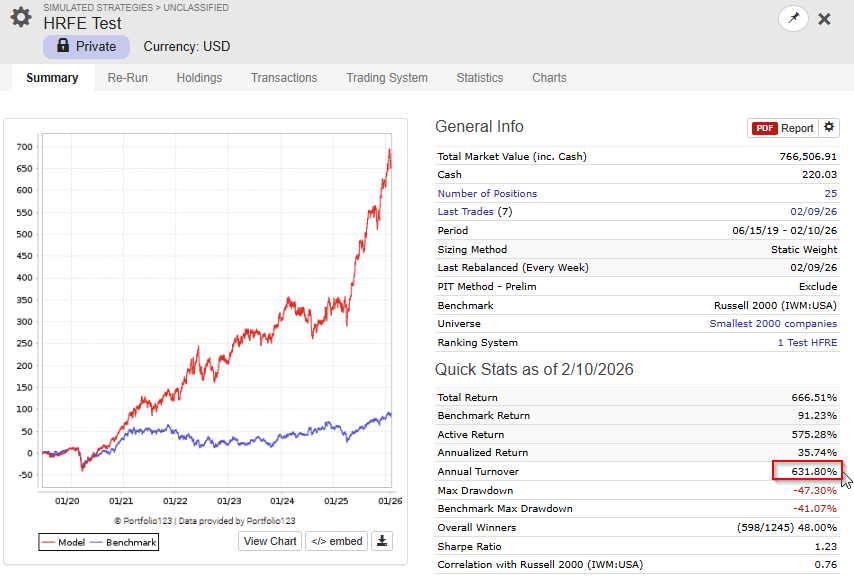
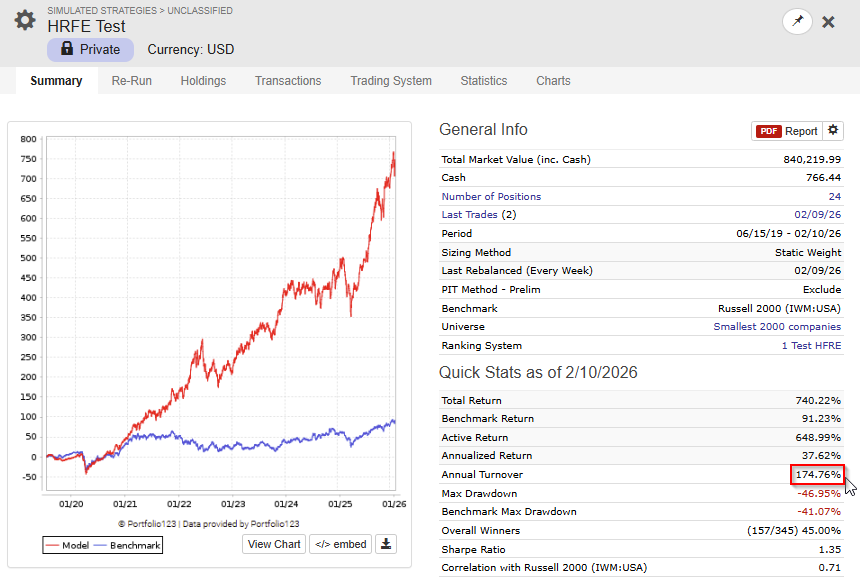
I did a quick test to show how effective the Autocorrelation function is. I did a very simple test, I let the app chose 30 anchors with no restrictions to autocorrelation first. Then I build ranking system only with the metamodel (used no support features, just to for this test).
This is the OOS backtest with no limitations on autocorrelation.
Then I did a second test letting the app chose 30 features withminimum autocorrelation level of 0.95
Can you explain how so called 'autocorrelation' works in the app ? Thanks!
- Take a single date — rank all stocks by the feature value (cross-sectional rank)
- Take the next date — rank all stocks by the same feature
- Compute the Spearman correlation between those two sets of ranks
- Repeat for every consecutive date pair in the dataset
- The autocorrelation is the mean of all those period-to-period rank correlations
I think that the Autocorrelation filter and the Top Focus function (for the meta model) is the two most important features in the app.
1 Like
That universe is small/micro cap companies from North America and North Europe.
1 Like
@AlgoMan thank you for all the efforts you’re putting into your app, including documentation and copious amounts of communication to the P123 community. I am grateful for it all.
I used the app for a few weeks in late January to whittle down my feature set. I moved on to other efforts for a while and now, with the latest improvements in your app, I’ll give it another go.
Thanks again.
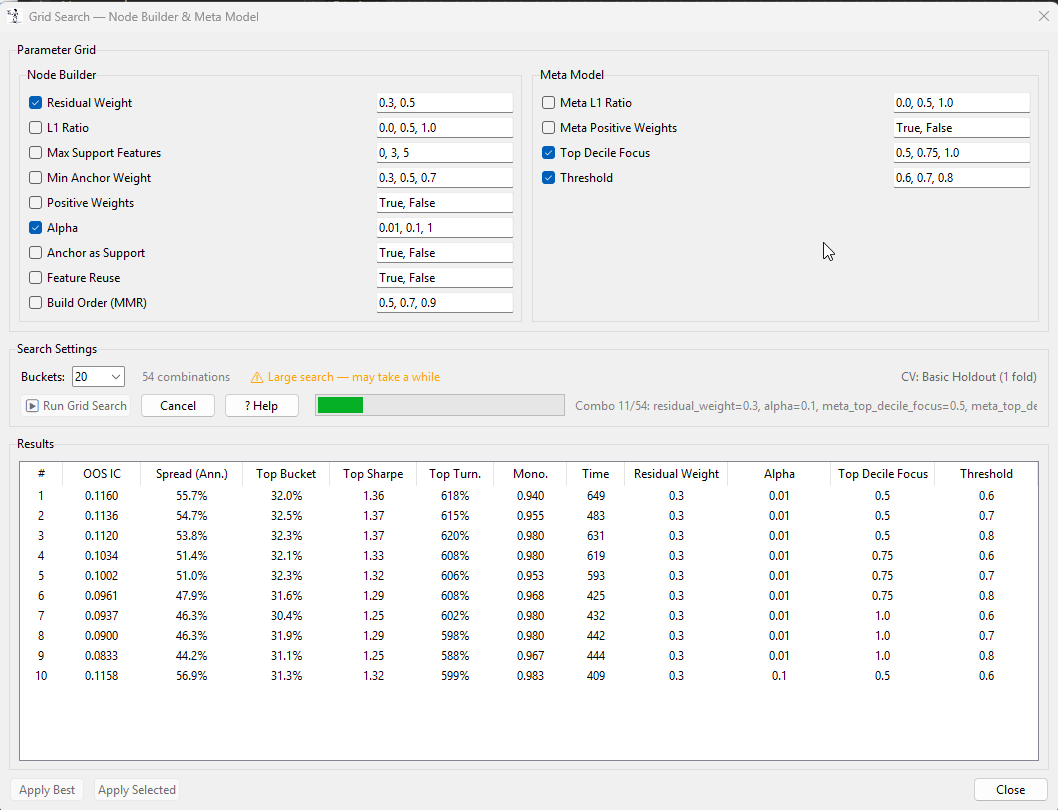
I will upload a v2.5 this weekend. This version will have a grid search for the validation settings.
Thanks @AlgoMan, this is a really promising tool.
I keep running into an issue with the “Run Validation” step getting stuck shortly after starting, with the cancel button not seeming to have any effect. I’ve only had one run out ouf about 7 or 8 attempts succeed. I haven’t been able to get a stack trace yet to help debug this issue but I will keep trying.
Log output in case it’s useful.
[00:05:20] [HEADER] ══════════════════════════════════════════════════
[00:05:20] [HEADER] STEP 6: VALIDATION
[00:05:20] [HEADER] ══════════════════════════════════════════════════
[00:05:20] [INFO] Configure validation settings and click 'Run Validation'
[00:05:29] [INFO]
[00:05:29] [INFO] ==================================================
[00:05:29] [INFO] RUNNING VALIDATION
[00:05:29] [INFO] ==================================================
[00:05:29] [INFO] Enabled anchors: 10
[00:05:29] [INFO] Validation folds: 4
[00:05:29] [INFO]
[00:05:29] [INFO] Node Building Configuration:
[00:05:29] [INFO]   Regularization: L1 ratio = 0.50
[00:05:29] [INFO]   Positive weights: Yes
[00:05:29] [INFO]   Fit intercept: No
[00:05:29] [INFO]   Alpha: manual (0.01)
[00:05:29] [INFO]   Max support features: 5
[00:05:29] [INFO]   Build mode: Blended (residual_weight=0.30)
[00:05:29] [INFO]
[00:05:29] [INFO] Meta Model Configuration:
[00:05:29] [INFO]   L1 ratio: 0.50
[00:05:29] [INFO]   Non-negative weights: Yes
[00:05:29] [INFO]   Top Focus: 0.50 (top gets 3.0x weight, threshold=60%)
[00:05:29] [INFO]
[00:05:29] [INFO] Starting validation...
[00:05:30] [INFO] Master IC Cache: 1070 dates × 284 features
I have not tried with such a big dataset before, I suspect that it might be a memory issue. How much RAM does your machine have?
When I run with 167 features the app peaks using about 16GB memory.
You can try with a smaller dataset. If you don't want to download a new dataset you can reduce the dataset you are working with on the Feature Quality Tab and download a new reduced CSV file.
In the next update I will add some more progress information in the Console that also will help with faultfinding.
2 Likes
Hi @AlgoMan I have a doubt on the recommended future return you suggest in your app.
All the forward features you suggest use the formula with D. Which looks at trading days and not bars. So for example if there is a holiday a friday, Future%Chg_D(5) will return the Forward Weekly returns over 4 days of trading and not 5. Future%Chg(5) solves this with bars instead of days. So you will always have 5 trading days with Future%Chg(5) even when there are holidays.
When computing IC and tstat it is important that the target variable (like future returns) always has the same quantity of information through time (so always 5 days of trading returns for example)
Do you agree?
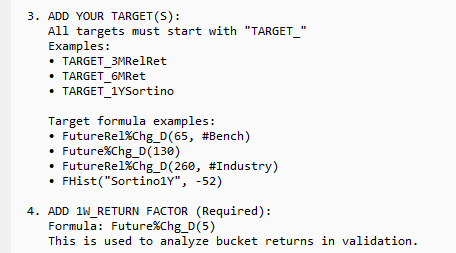
Not really. Future%Chg_D is from what I can see the standard P123 AI Factor as well. If you use Future%Chg, over x-mas in Europe you would get close to two weeks return (the market is still open in US).
It has been discussed a few time before.